
What an ATS actually does
An applicant tracking system is not a gatekeeper with an opinion about your career. It is a database with a form on the front and a search box on the back.
When you upload a resume, three things happen in sequence. First, a parser extracts text from your file and tries to sort it into structured fields: name, email, phone, employer, job title, start and end date, degree, skills. Second, those fields are written to a candidate record alongside whatever you typed into the application form. Third — and this is the part that decides your fate — a recruiter opens the requisition and runs searches and filters against those records: registered nurse AND ICU AND BLS, or Java AND Kubernetes, 3+ years, within 50 km.
So the real failure mode is not rejection. It is invisibility. If the parser could not tell that "Senior Platform Engineer, Acme Corp, 2022–2026" was a job, then your five years of Kubernetes work never entered the field the recruiter is searching, and you simply do not appear in the list of 40 people they review. Nobody rejected you. Nobody saw you.
Everything below follows from that single idea. Make the machine's job trivial, then spend your remaining effort on the human who reads the shortlist.
Four myths worth dropping before you edit anything
Myth 1: "The ATS gives my resume a score and rejects it below a threshold"
Mainstream systems do not auto-reject on a formatting score. Some offer recruiters an optional match percentage against the requisition, which is a ranking aid, not a bouncer. The auto-rejections that do exist come from knockout questions in the application form — work authorisation, licence held, minimum years, salary band, willingness to relocate. Answer those carefully; they matter more than your font.
Myth 2: "A specific percentage of resumes never reach a human"
You will see confident numbers quoted for this. They trace back to vendor marketing rather than to published research, and they vary wildly depending on who is selling what. Ignore the statistic and fix the mechanism instead: parse cleanly, match the search terms, be readable.
Myth 3: "Design kills your chances"
Design does not kill your chances. Specific structural choices do — multi-column text flow, content locked inside tables, text baked into images, and content in the page header or footer region. A clean, typographically confident single-column resume with colour accents parses fine.
Myth 4: "I should hide keywords in white text"
The parser strips your styling and keeps the words, which means the recruiter sees the keyword dump in the extracted text view. This is one of the fastest ways to get flagged in an employer's database. Do not do it.
Send a text-based PDF with a single-column layout, conventional section headings, and vocabulary borrowed from the specific job posting — then make sure a human reading it can see a result in every bullet.
Rules 1–3: file format and naming
Rule 1 — Send a text-based PDF by default
A PDF exported from a document editor or a resume builder contains a real text layer. Every mainstream applicant tracking system handles it, and unlike DOCX it renders identically on the recruiter's screen to what you saw when you exported it. Switch to DOCX only when the posting explicitly asks for Word, or when an older bespoke portal refuses PDF uploads.
The exception that genuinely breaks everything: a scanned or image-only PDF. If you printed your resume, signed it and photographed it, there is no text to extract. Unless the employer's stack runs OCR, your file parses as blank. The same is true of a resume exported as a single flattened image from a design tool.
Rule 2 — Name the file like a professional document
Use Firstname-Lastname-Role.pdf, for example Priya-Nair-Registered-Nurse.pdf. Recruiters download dozens of attachments into one folder; resume_final_v7(2).pdf is a small unforced error. Avoid spaces and special characters, which some portals mangle.
Rule 3 — Upload the file even when you also fill the form
Many portals let you "autofill from resume" and then edit the parsed fields. Do both, and check what the autofill got wrong before you submit. That preview screen is the single most useful piece of feedback you will ever get about how your resume parses — it is literally the system showing you its interpretation.
Rules 4–8: layout and structure
Rule 4 — One column, top to bottom
This is the highest-value rule in the guide. Text extraction reads in document order. In a two-column design, that order interleaves your sidebar with your experience, producing lines like "Skills Senior Engineer Python Acme Corp SQL 2022". A recruiter looking at that parsed record cannot tell where you worked.
Keep a single-column flow for anything you upload to a portal. If you want a designed two-column version for your own site or for emailing a hiring manager directly, keep it as a separate file.
Rule 5 — Keep content out of headers, footers and text boxes
Some parsers ignore the header and footer regions of a page entirely. Putting your phone number or email there is a good way to become uncontactable. Text boxes and shapes are similarly unreliable — content inside them may be extracted last, out of order, or not at all.
Rule 6 — Do not use tables to lay out content
A skills matrix built as a 4×5 table looks tidy and extracts as a jumble. Use plain lines with a label and a comma-separated list instead:
Fragile
A bordered grid with one skill per cell, four columns wide.
Safe
Languages: Java, Kotlin, Python, SQL
Cloud: AWS (ECS, Lambda, RDS), Terraform
Rule 7 — No text inside images, icons or charts
Skill rating bars, doughnut charts of your "proficiency", logo grids of technologies, a photo of your face containing your name — none of this is extractable text, and skill bars communicate nothing anyway. Nobody has ever known what four out of five stars in Python means.
Rule 8 — Use standard bullets and safe typography
Round or square bullets and standard hyphens extract predictably. Decorative glyphs from icon fonts sometimes come through as replacement characters that pollute the start of every line. Stick to a common, well-hinted typeface, keep body text at 10–12 pt, and leave real white space between sections — a page a human squints at is a page a human skips.
Rules 9–10: headings and the contact block
Rule 9 — Use section headings the parser already knows
Parsers segment your resume by matching headings against a known vocabulary. Creative headings break that segmentation, and everything underneath gets filed as unclassified text.
| Use this | Not this |
|---|---|
| Professional Summary | About Me, My Story, Hello! |
| Work Experience or Professional Experience | Where I've Made an Impact, My Journey |
| Skills or Technical Skills | My Toolbox, Superpowers, What I Bring |
| Education | Academic Adventures, Learning |
| Certifications or Licences & Certifications | Credentials & Kudos |
| Projects | Things I've Built, Side Quests |
Order matters too, because recruiters skim the top third. Put the sections carrying your strongest evidence first: experience for anyone with two or more years, education and projects first for new graduates, licences and certifications near the top in regulated fields like nursing.
Rule 10 — Keep the contact block plain and complete
Name on its own line as the largest text on the page. Then, in the body of the document (never the header region): city and region, phone with country code if you are applying internationally, a professional email address, and plain-text URLs for LinkedIn or a portfolio. Write linkedin.com/in/yourname rather than hiding the address behind the words "my profile" — extraction keeps the visible text, not always the underlying link.
Leave off your full street address, date of birth, marital status, and a photo unless the norms of the country you are applying in genuinely require them. In the UK, US, Canada and Australia, a photo is a liability rather than an asset.
Rules 11–13: keywords, done honestly
Rule 11 — Work from one job description at a time
Open the posting. Copy out every hard requirement, tool, certification, methodology and domain term. That list — not a generic industry keyword list — is your target vocabulary. If the posting says "revenue cycle management" and your resume says "billing operations", a recruiter searching the requisition's own language will not find you.
Then be precise about direction: mirror the employer's phrasing for things you genuinely have, and leave out the rest. Tailoring is not the same as claiming.
Rule 12 — Spell out acronyms once, both ways
You do not know which form the recruiter typed into the search box. Write it as Continuous Integration / Continuous Deployment (CI/CD) the first time, or Advanced Cardiac Life Support (ACLS), and use the short form thereafter. One sentence covers both searches.
Rule 13 — Put keywords in context, not just in a list
A skills line proves you know a word. A bullet proves you used the thing. Recruiters read the bullet.
Keyword only
Skills: Terraform, AWS, Kubernetes, CI/CD, PostgreSQL, monitoring
Keyword in context
Migrated 40+ services from hand-managed EC2 to Terraform-provisioned EKS, cutting environment setup from two days to 25 minutes.
Keep the skills line — it helps search — but make sure the important terms also appear inside real work.
Rules 14–15: job titles, dates and gaps
Rule 14 — Use the industry-standard title, keep the internal one in brackets
If your company called you a "Growth Ninja" or a "Member of Technical Staff III", nobody is searching for that. Lead with the recognisable equivalent and preserve the official title where accuracy demands it: Marketing Manager (internal title: Growth Ninja). This is clarification, not invention — do not promote yourself a level in the process.
Rule 15 — Format dates consistently and account for gaps
Pick one format and never vary it. MM/YYYY – MM/YYYY or Mar 2023 – Present both parse well. Mixing "2023-2024" with "March 2024 to now" makes duration calculations unreliable, and duration is exactly what "3+ years experience" filters compute.
For a gap longer than a few months, a single dated line removes the question entirely: Career break — full-time caregiving, 05/2024 – 02/2025. Recruiters do not penalise explained gaps nearly as much as they puzzle over unexplained ones.
Rules 16–18: bullets, quantities and length
Rule 16 — Every bullet: action, object, result
Start with a past-tense verb, name the thing you did it to, and finish with what changed. If a bullet has no result, it is a job description, not an achievement.
Responsibility
Responsible for managing the onboarding process for new clients and maintaining documentation.
Achievement
Rebuilt client onboarding into a seven-step checklist, cutting average time-to-first-invoice from 21 days to 9 across 60 accounts.
Rule 17 — Quantify with whatever you actually have
You do not need revenue figures. Volume, frequency, scale, time saved, error rate, team size, budget, number of stakeholders and before/after comparisons all work. "Handled a high volume of tickets" is noise; "cleared a 400-ticket backlog in six weeks while holding first-response time under two hours" is evidence.
If you cannot verify a number, do not invent one. Use a range, a count you are sure of, or describe the scope instead.
Rule 18 — Length: one page under ten years, two pages after
One page for students, new graduates and anyone with under roughly ten years of relevant history. Two pages for established professionals, and genuinely more for academic CVs and clinical roles where publications, licences and rotations are the substance. Never shrink a two-page resume to one by dropping to 8 pt type and killing the margins — a dense page is worse than a second page.
Within that: three to five bullets for recent roles, one or two for older ones, and a summary of three to four lines. Cut anything from more than about fifteen years ago unless it is directly relevant.


How NextCV scores a resume
Rather than guessing, it helps to know how a scoring model weights things. The NextCV ATS analyser scores seven sections and combines them into a single number out of 100:
| Section | Weight | What moves the score |
|---|---|---|
| Work Experience | 30% | Quantified achievement bullets, consistent dates, recognisable titles |
| Skills | 20% | Relevant, categorised, and mirrored from the target posting |
| Professional Summary | 15% | Role-specific, three to four lines, no generic adjectives |
| Personal Information | 10% | Complete, reachable contact fields in the document body |
| Education | 10% | Degree, institution, completion year, relevant coursework where useful |
| Projects | 10% | Outcome and stack described, not just a name and a link |
| Certifications | 5% | Issuing body and validity dates included |
The bands are 0–40 poor, 41–60 average, 61–80 good, and 81–100 excellent. The weighting tells you where to spend your evening: rewriting three experience bullets is worth far more than polishing your certifications block. The full breakdown of each sub-check lives in the ATS Score Guide.
Template choice contributes too, because it determines the structural risks. Across the 29 NextCV templates, scores range from 72 to 98, with the single-column parser-first layouts — ATS Pro at 98, ATS Minimal and Software Engineer ATS at 96, Pure White at 95 — at the top, and heavily designed portfolio layouts at the bottom.
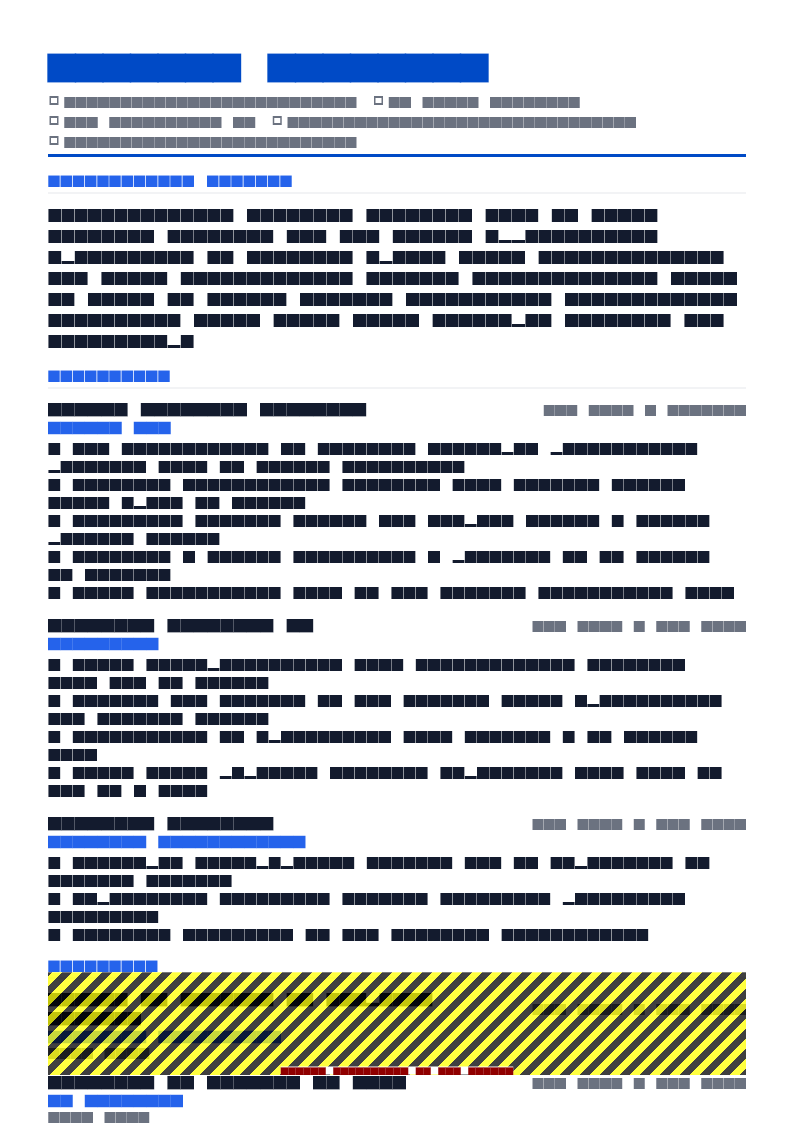
ATS Pro resume template
ATS Pro removes most of the parsing risk in this guide by construction: single column, conventional headings, nothing in the page header region, and no graphics carrying text. Highest-parsing layout in the library, free.
Use this template in NextCVThe plain-text test: 60 seconds, no tools
Before you submit anything, do this once:
- Open your exported PDF.
- Select all, copy, and paste into a plain text editor — Notepad, TextEdit in plain mode, or any code editor.
- Read what comes out.
You are looking for four things. Is every section heading still on its own line? Do employer, title and dates still sit together? Are your phone number and email present at all? Is the reading order still sequential rather than interleaved?
If the paste looks like a shuffled deck, the parser sees the same shuffled deck. Fix the layout, not the wording.
Paste the plain text and the job description side by side. Every hard requirement in the posting that you genuinely meet should be findable in your text with Ctrl+F. The ones you cannot find are your edit list.
Pre-submit checklist
- Text-based PDF, named
Firstname-Lastname-Role.pdf - Single-column layout, no text boxes, nothing in the page header or footer
- No tables, charts, skill bars or text inside images
- Conventional headings: Professional Summary, Work Experience, Skills, Education, Certifications
- Contact block in the document body, with plain-text URLs
- Every acronym spelled out once alongside its short form
- Dates in one consistent format, gaps longer than a few months labelled
- Recognisable job titles, internal titles in brackets where needed
- Each recent role has three to five bullets, each with a result
- Skills reordered so the posting's own terms come first
- Plain-text paste test passed
- Knockout questions in the application form answered accurately
Frequently asked questions
Does an ATS automatically reject my resume?
Almost never on the basis of formatting alone. An applicant tracking system is a database: it parses your file, stores the fields it recognises, and lets recruiters search and filter.
Automatic rejection usually comes from knockout questions in the application form — work authorisation, minimum qualification, salary range — not from a hidden formatting score. Bad formatting hurts differently: your experience never makes it into the searchable fields, so you do not appear in the recruiter's shortlist at all.
Is PDF or Word better for an ATS?
A text-based PDF is safe with every mainstream system and preserves your layout exactly, so it is the better default. Send DOCX only when the job posting explicitly asks for Word, or when you are uploading to an older custom portal that rejects PDFs.
Never send a scanned or image-only PDF: it contains no extractable text, and unless the system runs OCR your resume parses as an empty document.
How many keywords should a resume contain?
There is no target count. Work from one specific job description: pull out the hard requirements and repeated tools, then make sure each one you genuinely have appears somewhere it makes sense — in a bullet describing the work, in your skills list, or in your summary.
If a term only appears in a keyword block and never in your experience, a recruiter reading the resume will notice the gap immediately.
Should I use a two-column resume template?
Not for online applications. Two-column layouts are the most common cause of scrambled parsing, because the extractor reads across the page and interleaves the sidebar with your experience.
Keep a single-column layout for anything you upload, and save the designed two-column version for a portfolio site or an email attachment sent directly to a human.
Do I need to tailor my resume for every application?
You need to tailor the top third and the skills list, not rewrite the whole document. Keep one master resume, then for each role adjust the summary, reorder skills so the ones named in the posting come first, and adjust two or three bullets to use the employer's vocabulary.
That is usually a ten-minute edit and it is what moves you up a keyword search.
Can I put white keywords in the background to trick the ATS?
No. Hidden white text, keyword-stuffed footers and invisible font tricks are extracted as plain text like everything else, so a recruiter sees them the moment they open the parsed profile or copy the text out.
It reads as dishonest and it is a fast route to being removed from consideration and flagged in the employer's database.
NextCV Editorial
NextCV is an AI resume builder by Empire Softtech. We publish the same guidance our in-app ATS analyser is built on — seven weighted sections, 29 templates scored from 72 to 98, and no formatting advice we would not follow ourselves.